iPhone Duo workout app: your gym session, unfolded
Open it and your workout splits in two: the video and cues on the left, your sets and rest on the right. What Basalt Lab shows on iPhone Duo, open, closed or side by side.
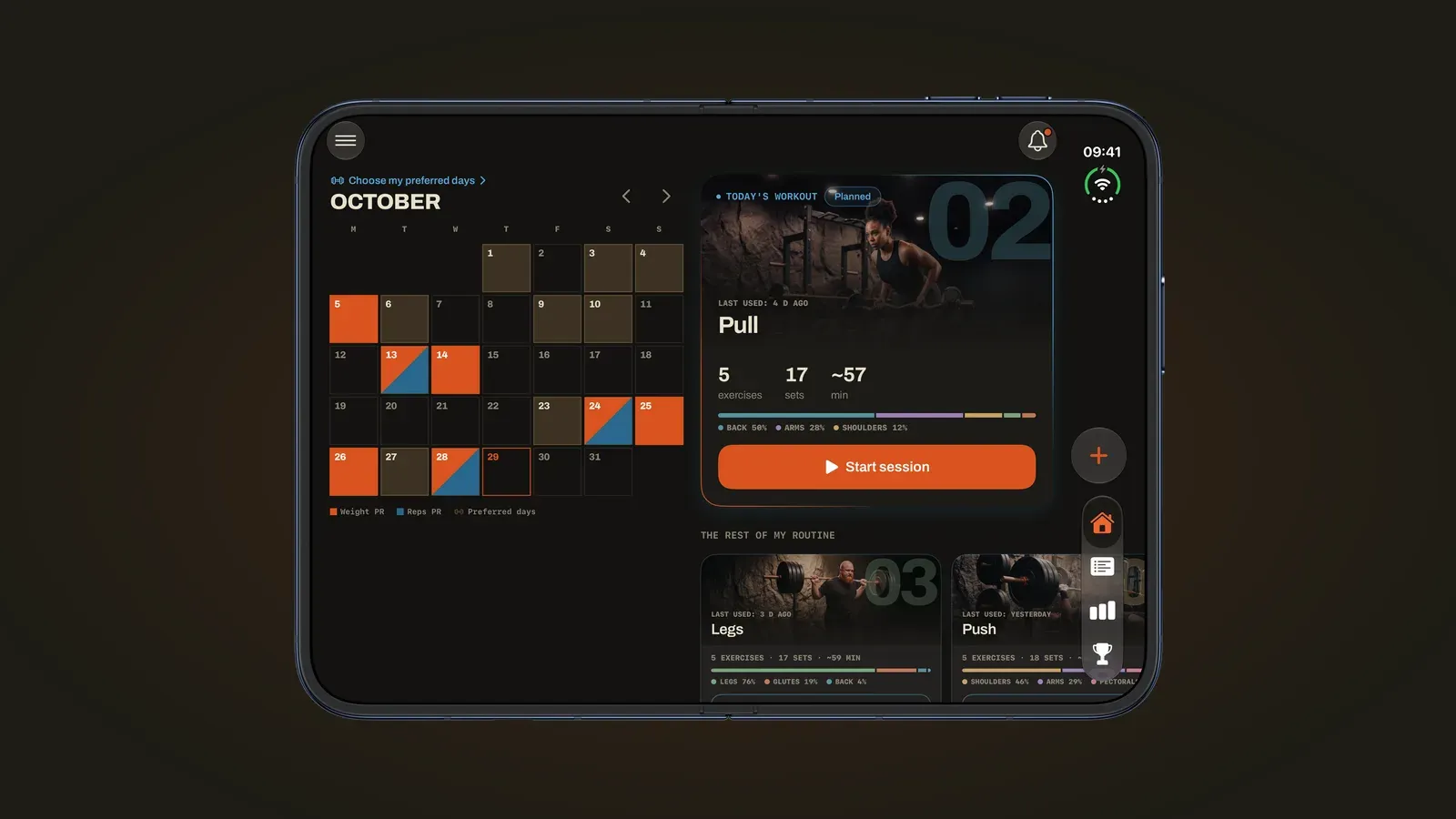
On iPhone Duo, Basalt Lab uses both halves of the screen. Open it and your workout splits in two: the exercise video and cues on the left, your sets and rest on the right. Closed, the same workout fits on the outer display, and folding or unfolding the phone mid-rest doesn’t interrupt it.
That’s version 1.1.0 of the app, released on October 29, 2026 and built for the first foldable iPhone, on sale since October 23. Its inner display measures 7.6 inches, its outer display 5.4 inches. Here is, screen by screen, what the app shows and how to use it at the gym.
Open: your workout in two columns
Open, the workout screen shows what the exercise asks for and what you have done, at the same time. You no longer go back and forth between the video and logging: it all fits on the inner display.
On the left, the exercise. The movement video, its name and target muscle, its details and the button to replace it. The rest timer shows up there as soon as you complete a set, along with the next set.
On the right, your sets. The one you just logged, the next one and the ones left, with the target reps. With Pro, each set also shows what you did last time.
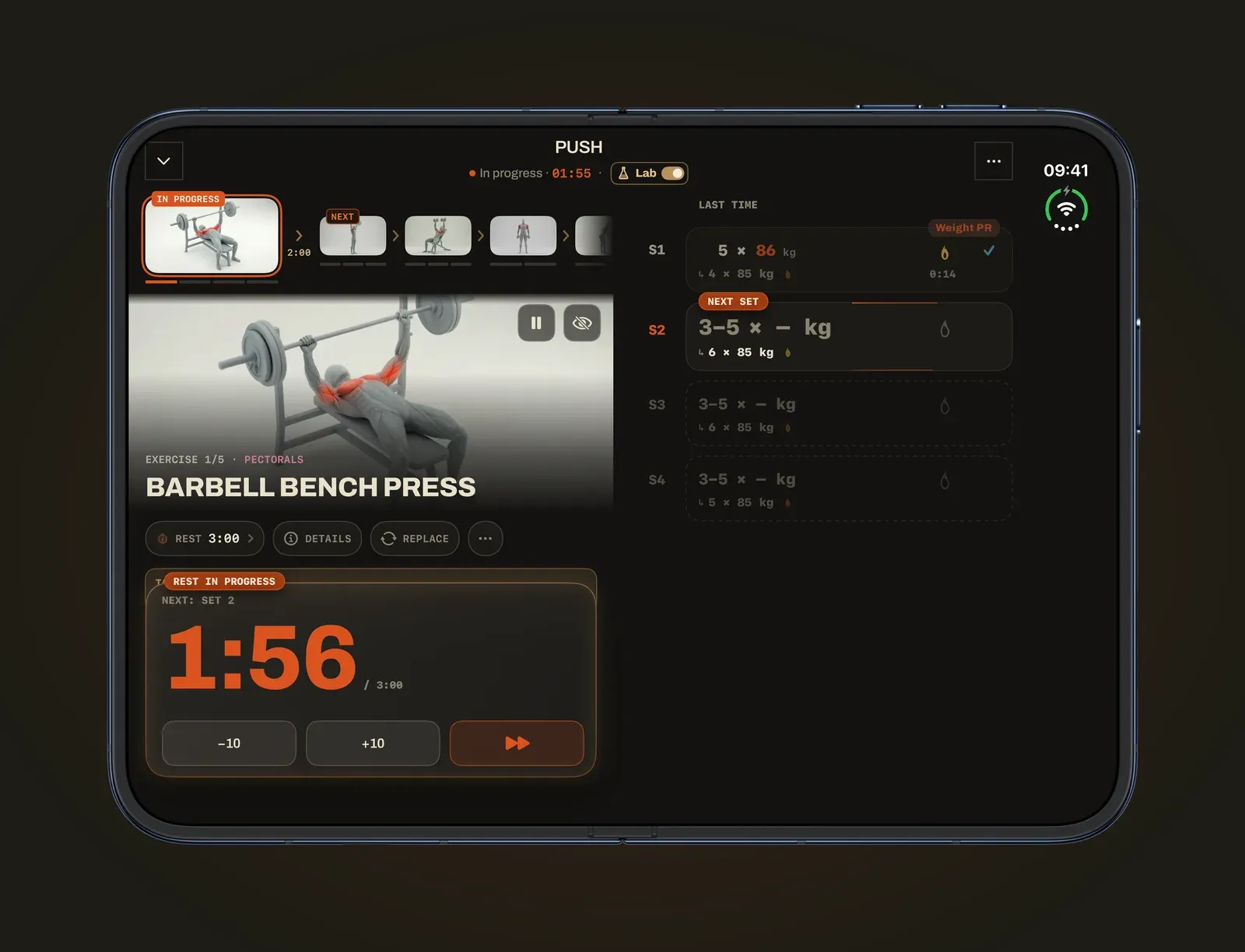
The difference shows on an exercise you don’t know well: you watch the video during your warm-up set, log the set without switching screens, and the rest starts right next to it.
Closed: the same workout on the outer display
Closed, iPhone Duo keeps a 5.4-inch display, which Apple says offers 90 percent of the screen area of iPhone 18 Pro. That’s enough to log a set in a few taps and check your rest at a glance.
The workout fits in one column. At the top, the current exercise and the next ones; in the middle, a “Target” line that shows the sets, reps and rest to aim for; below, your sets and the timer.
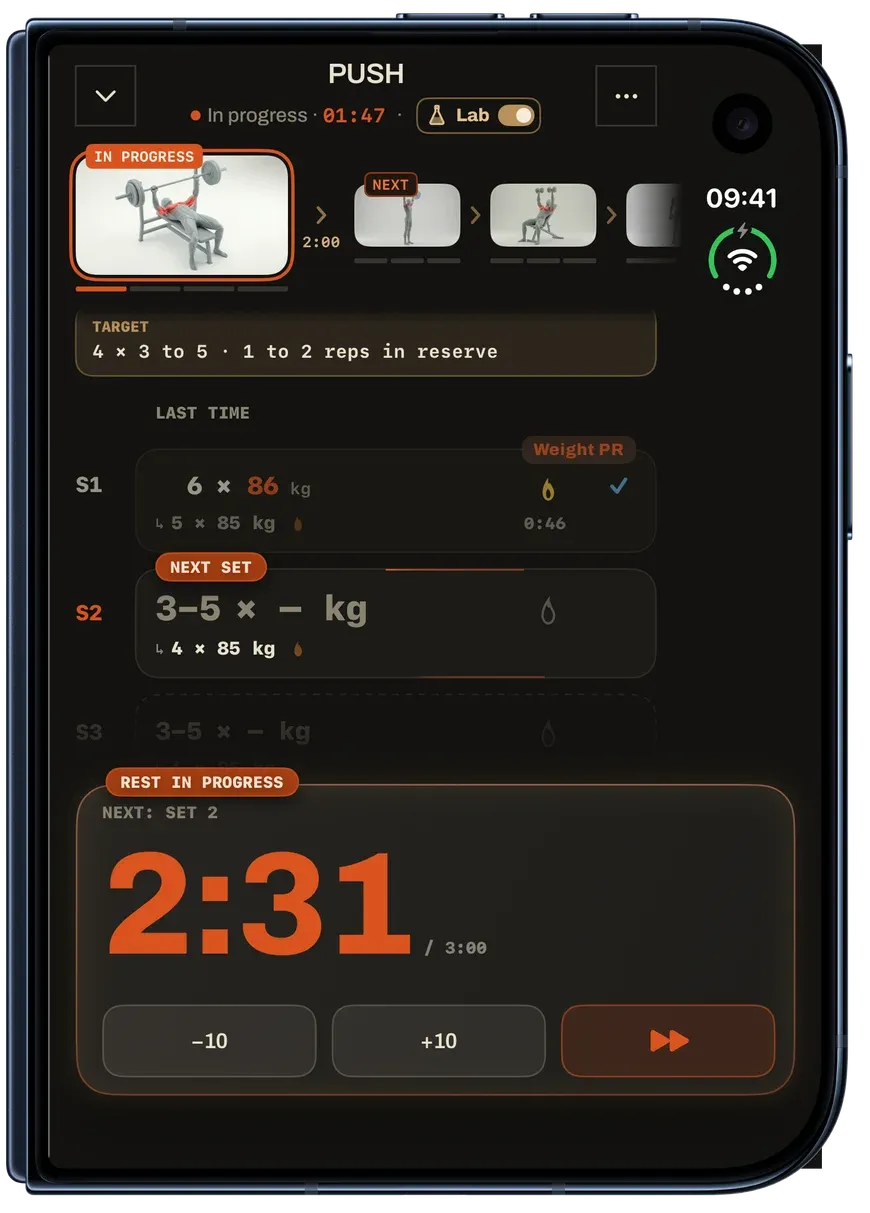
For heavy sets, that’s the right setup: closed, the phone fits in one hand and goes in a pocket, and nothing makes you unfold it to log.
Fold or unfold mid-rest
Your workout carries on when you open or close the phone. The rest timer and your sets follow from one display to the other: you lose neither the set in progress nor your recovery time.
Apple describes the same idea for the whole of iPhone Duo: content adapts as you fold the device. Basalt Lab uses it to switch layouts, one column closed, two columns open. At the gym, a simple split works well:
| Moment in the workout | iPhone Duo | What you see |
|---|---|---|
| Learning an exercise | Open, propped up | The video and cues next to your sets |
| Heavy set | Closed, or the set logged on Apple Watch | Your sets and rest, large |
| Rest | Open or closed | The timer and the next set |
| Workout recap | Open | Your month and your stats |
Open the phone during the rest before a new exercise: you have time to watch the video, then close it for the set.
Home and stats on the big screen
Home shows your month next to today’s workout: the calendar and your PRs on the left, the planned workout on the right, ready to start. You see how consistent you are without leaving what you are about to do.
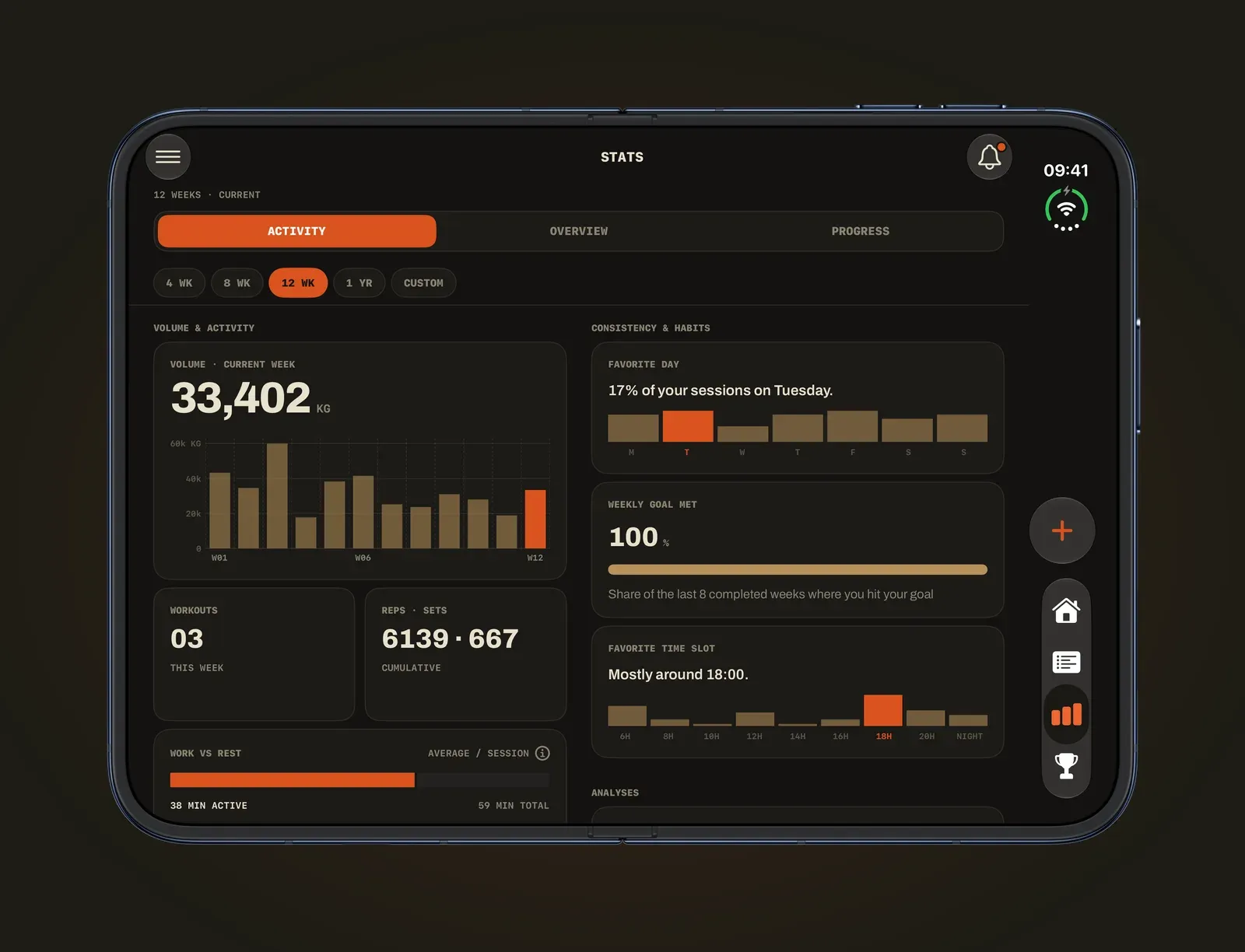
Stats, for their part, lay out their sections two by two. The week’s volume, your workouts, your favorite day or your usual time slot fit on a single screen when you review your training.
Side by side: your music next to your workout
iPhone Duo is the first iPhone that opens two apps side by side, with Split View. Basalt Lab adapts to it: your workout on one side, your music or a written program on the other.
That helps for a simple reason: switching apps between sets costs time and attention. With both apps in view, you change the track and log your set without leaving the screen. If you follow a program written elsewhere, like an upper lower split, you have it in front of you while you log.
At the gym: battery and stand
The inner display uses more power than the outer one. Apple quotes up to 31 hours of video playback on the inner display, against 44 hours on the outer display, and up to 24 hours when both are used equally. An hour-long workout won’t drain the phone, but close it during long rests: your rest between sets is easy to follow on the outer display.
Version 1.1.0 works the same way: during rest periods, the workout screen does almost no work, so your iPhone runs much cooler and saves battery. To keep the screen upright, Apple sells a folio case whose kickstand holds a range of angles. Without one, prop the phone against something stable, away from bars and dumbbells.
Frequently asked questions
Do you need an iPhone Duo to use Basalt Lab?
No. The app runs on any iPhone with iOS 17 or later. Version 1.1.0 adds a layout for the foldable display; on another iPhone, the workout, the video and your sets stay the same, on a single screen.
Does your workout stop if you close the phone?
No. It carries on when you open or close the phone: the set in progress and the rest don’t stop, and the outer display picks up where the inner one was.
Which screen should you use to log a set?
The outer display is enough: a set takes a few taps. The inner display is mostly for seeing the video and cues next to your sets, or for reviewing your workout at the end.
Does Apple Watch work with iPhone Duo?
Yes. You set the weight and reps with the Digital Crown and log your set on your wrist; your iPhone Duo, within reach, records the workout. With version 1.1.0, your taps on the watch reach your iPhone faster. The details are in log a workout on Apple Watch without your phone in hand.
Open to learn and to review, closed to lift: iPhone Duo serves your workout when you need the big screen, and gets out of the way the rest of the time.
Sources
- Apple unveils iPhone Duo, Apple Newsroom, 2026.
- Basalt Lab: Workout Tracker App, App Store, version 1.1.0 release notes, 2026.