Workout log: notebook, spreadsheet or app?
Paper notebook, spreadsheet or app: what each one does well for tracking your lifting, what it costs you between two sets, and which one you will actually keep up for months.
All three work, on one condition: you log every working set as you do it. A paper notebook is the easiest to start, a spreadsheet the most powerful to analyze, an app the fastest to fill in at the gym. The right choice is the one you will keep up, set after set, for months.
The habit matters more than the medium. A meta-analysis of 138 studies and almost 20,000 participants found that monitoring your progress helps you reach your goals, and that the effect is stronger when progress is written down rather than kept in your head. What is left is choosing where to write it, knowing what each option costs you between two sets.
What your log has to do, whatever the medium
A workout log has one job: deciding today’s session from the last one. For that, it has to keep the weight and reps of every working set, show you last time before you start, and let you see the trend over several weeks.
That is the precondition of progressive overload: asking for a little more than last time means knowing exactly what last time was. What to write down fits in three lines, covered in progressive overload starts with remembering.
Memory does not do this job. A review of 187 studies compared self-reported physical activity with measured activity: the gaps run both ways, with no rule to correct them. For your sets, that means a weight that comes back wrong, too light one day, too heavy the next.
How many numbers you have to log
More than you would think. The site’s beginner full body program has 16 sets per session, in workout A as in workout B. At three sessions a week, that is 48 sets, and 576 over twelve weeks.
Each set takes two numbers, weight and reps (a duration for planks): close to a hundred numbers a week. And they get written during rest: one to three minutes depending on the exercise in this program, a simplified version of the ranges in the guide to rest between sets.
That count changes the question. It is not about which option does the most, but which one lets you log 48 sets a week without thinking about it, then find the right line among 576.
The paper notebook: simple, but silent
A notebook takes a minute to start and never runs out of battery. That is its real strength: nothing to install, nothing to charge, and writing by hand leaves little room for guesswork.
What it does well. One line per exercise, sets in a row: “Squat, 80 × 8, 80 × 8, 80 × 7, last rep slow”. You read the session at a glance, and there is no phone in your hand between sets.
What it does not do. It calculates nothing and does not show you last time. To find your last squat session, you flip pages, and after a few weeks the right line hides among hundreds of others. Seeing a trend means copying the numbers somewhere else.
Who it suits. You are a beginner, you run a short, stable program, and you want to train without a screen. Keep one page per workout: last time is then on the previous page.
The spreadsheet: powerful, but not built for the gym
A spreadsheet is the most powerful option: one row per set, and formulas do the rest. Its weak point is data entry. Filling in a grid on a phone, between two sets, takes longer than your rest allows.
The layout that works. One row per set, never one row per session: that is what lets you filter an exercise and chart it. The two calculated columns use the Epley formula, the default in the site’s 1RM calculator.
| Column | Content | Example |
|---|---|---|
| A | Date | 2026-11-02 |
| B | Exercise | Squat |
| C | Set | 1 |
| D | Weight (kg) | 80 |
| E | Reps | 8 |
| F | Volume: =D2*E2 |
640 |
| G | Estimated 1RM: =D2*(1+E2/30) |
101.3 |
The estimate holds best under ten reps; for a single rep, take the weight as it is. A set of fifteen measures your endurance more than your max.
The trap. Many people fill in the spreadsheet in the evening, from memory. A set written down after the fact is already an estimated set. If you want the spreadsheet, write at the gym on paper or in a note, and copy it over the same day.
The app: the shortest way to log
A lifting app is built for logging during rest: a set is saved in a few taps, the session joins a history, and the math happens without formulas. The price is a charged phone or watch, and a tool you did not build yourself.
That is the idea behind Basalt Lab: spreadsheet rigor, without a grid to fill in. You log a set in a few taps on iPhone, or from your wrist on Apple Watch, setting weight and reps with the Digital Crown. The details are in log your workout on Apple Watch without your phone.
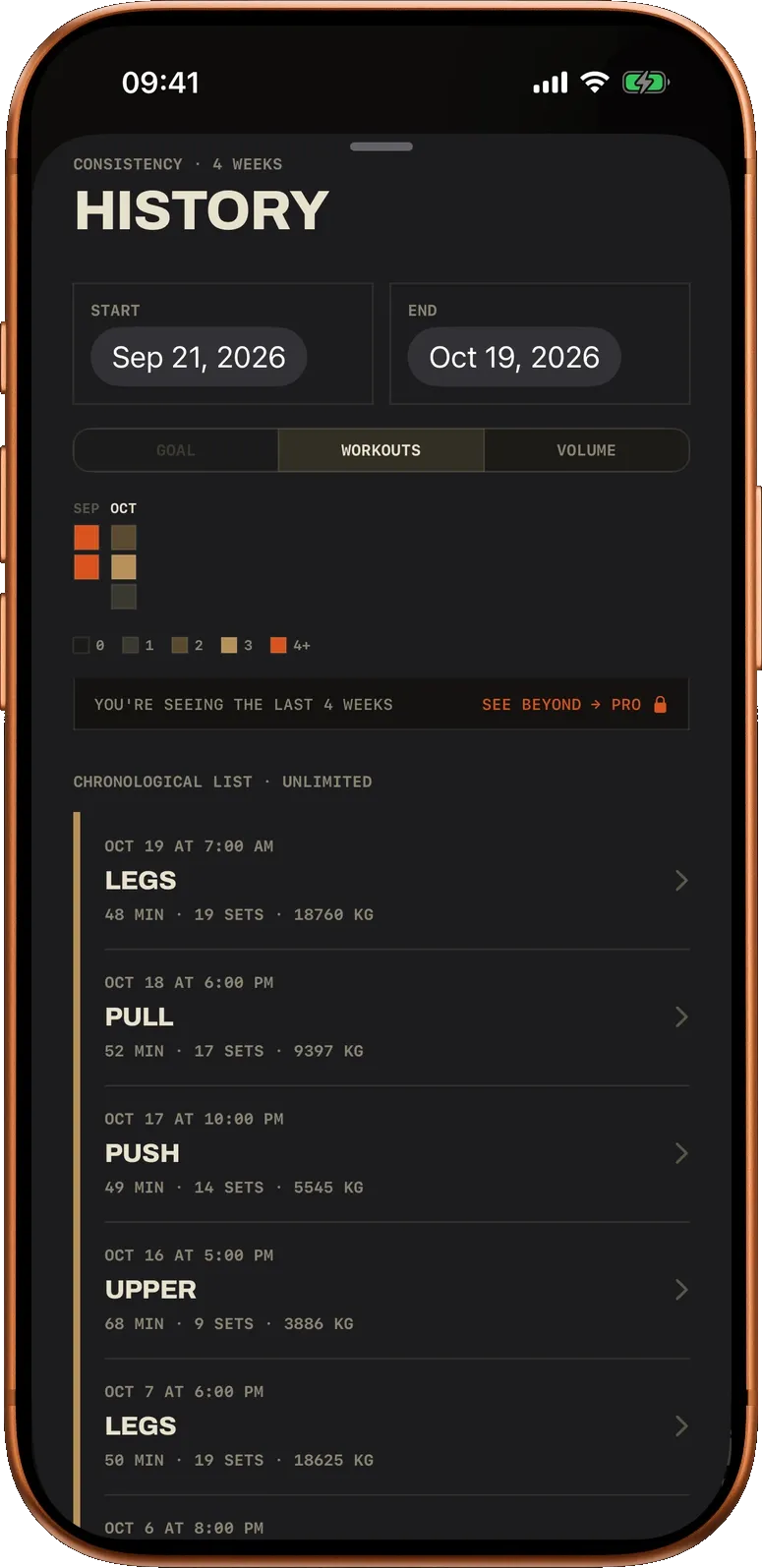
What it does that the others do not. Last time shows under each set without you having to look for it, and with Pro, your previous session is replayed set by set when you open the exercise. The workout history is unlimited, and 47 stats, 14 of them included, track your lifts over time.
What to check before choosing. That the app works without a signal, since many gyms have poor reception, and that your history belongs to you. In Basalt Lab, once you are signed in, the app works offline and your history lives on your device.
Which one to choose for the way you train
Choose by the moment you log, not by the feature list. If you log during rest, the fastest option wins; if you analyze on Sunday, the one that calculates wins.
| Criterion | Notebook | Spreadsheet | App |
|---|---|---|---|
| Getting started | Immediate | A grid to build | A few minutes |
| Logging during rest | Fast | Slow on a phone | Fast |
| Finding last time | Flip pages | Filter | On screen |
| Volume and estimated 1RM | By hand | By formula | Automatic |
| Seeing the trend | Copy it elsewhere | Chart to build | Stats ready |
| What can fail | A lost or wet page | A badly filled file | The battery |
You are starting out and want no screen: the notebook, one page per workout. You like to analyze: the spreadsheet, filled in at the gym, not in the evening. You want to log fast and see last time without searching: the app.
Frequently asked questions
What should you write in a workout log?
The weight and reps of every working set, a word on the last rep, and anything you changed on purpose: rest, tempo or exercise order. That is enough to decide the next session without turning the log into an archive.
Should you log warm-up sets?
No. They do not count toward your volume and do not decide today’s weight. Log only your working sets, the ones that count for progress.
How do you move from a notebook to an app without losing your history?
Copy over at least the last session of each exercise: that is the one that decides the next. The rest can stay in the notebook. In Basalt Lab, adding past sessions to the calendar is a Pro feature.
Which formula estimates your 1RM in a spreadsheet?
The Epley formula: weight × (1 + reps / 30), so =D2*(1+E2/30) if weight is in column D and reps in column E. It is the one behind the site’s 1RM calculator, most reliable under ten reps.
Notebook, spreadsheet or app, the best log is the one that already has last time’s line when you step back under the bar.
Sources
- Does monitoring goal progress promote goal attainment? A meta-analysis of the experimental evidence, Harkin B. et al., Psychological Bulletin, 2016.
- A comparison of direct versus self-report measures for assessing physical activity in adults: a systematic review, Prince S. A. et al., International Journal of Behavioral Nutrition and Physical Activity, 2008.